Athlete guides · 7 min read
Athlete Performance Tracking App: How to Run Fitness Tests and Actually See Progress
Which fitness tests to record, how to keep results comparable, and how athletes and coaches can use latest vs best to see real progress.
On this page
- 1. What a performance tracking app should record
- 2. Seven fitness tests worth tracking
- 3. Rules that keep results comparable
- 4. How often to test
- 5. Latest vs best: the view that matters
- 6. Using a fitness test app with your coach
- 7. For parents: what to look at
- 8. For coaches: tracking a whole batch
- 9. Mistakes that make tracking useless
- Frequently Asked Questions
- Final word
Every athlete wants to know one thing: am I getting better? Feelings help, but they lie. A good week feels like progress; a tired week feels like going backwards. Numbers recorded the same way, on a regular schedule, give a much more honest answer.
An athlete performance tracking app is simply a place to keep those numbers, next to your training plan and attendance, so you and your coach can see the trend. This guide explains which fitness tests are worth recording, how to run them so results are comparable, and how to use a fitness test app for athletes without turning training into paperwork. We use FAB SPORTS as the example, and we deliberately avoid fake "national average" tables. Your own best is your standard.
1. What a performance tracking app should record
Most athletes need only three kinds of data:
- Physical tests: speed, power, endurance, agility and core strength
- Sport skill tests: accuracy, consistency and decision-making under pressure
- Training context: attendance, the week's plan and coach notes
Without the context, a slow sprint time is just a number. With it, you can see that the athlete missed two sessions and trained through exams that week.
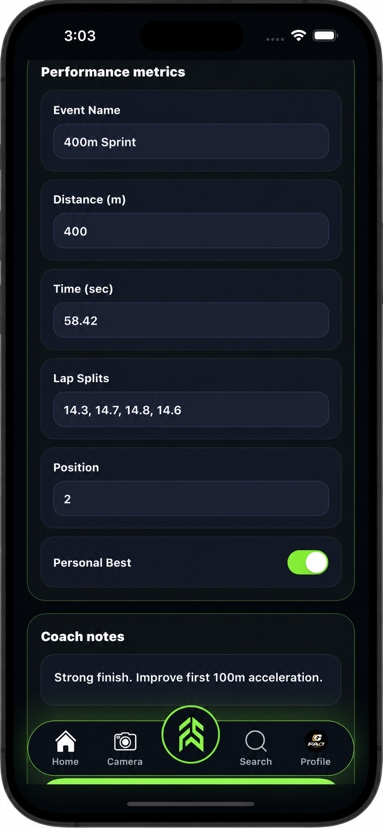
In FAB SPORTS, athletes have a sports profile with performance tests that show the latest and best result, day-by-day attendance, their coach's weekly plan and their achievements. Coaches can record tests for connected athletes and share updates. Every tool is free, no subscription.
2. Seven fitness tests worth tracking
You do not need a lab. These simple tests work on most grounds and courts. For detailed instructions, read Sports Performance Tracking: 7 Tests Every Young Athlete Should Record.
| Test | What it shows | Simple setup |
|---|---|---|
| Linear sprint (20 m or 40 m) | Acceleration and speed | Cones, stopwatch or phone timer |
| Endurance set (shuttle or timed run) | Work capacity | Marked distance, timer |
| Agility drill | Change of direction | Cones in a fixed pattern |
| Vertical or standing jump | Leg power | Wall mark or tape on the floor |
| Core hold (plank) | Stability | Mat, timer |
| Skill drill A | Accuracy or quality | Sport-specific target |
| Skill drill B | Skill under fatigue | Same drill after a conditioning set |
Pick four or five to start. Recording three tests consistently beats recording ten once.
3. Rules that keep results comparable
A test is only useful if next month's result can be compared with this month's. Agree on these rules before the first test:
- Same distance, same markings. Write down cone positions.
- Same surface. Grass, turf and indoor floors give different times.
- Same warm-up. A fixed ten-minute routine before every test.
- Same time of day, where possible.
- Same tester and method. Hand timing varies; keep the same person on the stopwatch.
- Best of two or three attempts, with the rule written down.
If something changes (a new ground, rain, a minor injury), add a note next to the result. Notes save arguments later.
4. How often to test
Testing too often wastes training time; too rarely and you cannot see trends. A rhythm many coaches like:
- Every 4 weeks: two or three physical tests and one skill drill
- Every 8–12 weeks: the full set
- Before and after a training block: for example, before and after summer camp
For sport-by-sport ideas on what to measure in cricket, football, badminton and athletics, see Sports Performance Tracking by Sport.
5. Latest vs best: the view that matters
One result means little. Two results start a story. The most useful view in any athlete performance tracking app puts your latest result next to your best:
- Latest close to best: you are in form; keep the plan.
- Latest well below best: check sleep, attendance, workload and injuries before changing anything.
- New best: note what you did differently in the last month.
FAB SPORTS shows the latest and best for each performance test, so this check takes seconds.
6. Using a fitness test app with your coach
Tracking works best when athlete and coach look at the same numbers together. A ten-minute monthly review is enough:
- Open the athlete profile and look at the last two or three test results.
- Check attendance for the same period.
- Pick one focus for the next four weeks, such as acceleration or endurance.
- Make sure the coach's weekly plan reflects that focus.
- Retest on the same day next month.
If you are an athlete training without a coach, the same loop works on your own. Read How to Use a Sports Tracking App to Actually Improve for a solo routine.
7. For parents: what to look at
Parents do not need to understand every test. Three questions are enough:
- Is my child attending regularly?
- Are their own results generally moving the right way over a few months?
- Is the coach explaining what the next focus is?
Avoid comparing your child with teammates. Children develop at different speeds, and growth spurts can make results jump around. For more, read How to Track Your Child's Sports Progress.
8. For coaches: tracking a whole batch
Testing twenty athletes sounds slow, but a station setup makes it manageable. Split the batch into groups, run one test per station, and record results in the app straight after each group finishes. In FAB SPORTS, coaches can record tests for connected athletes, mark batch attendance and set weekly plans with drills, so the full loop lives in one place. For a batch-level routine, see Sports Tracking App for Teams.
9. Mistakes that make tracking useless
- Changing the test every month. You lose the comparison.
- Chasing other people's numbers. Online "norms" often come from different ages, surfaces and methods.
- Testing when exhausted. Do tests after a warm-up, not at the end of a hard session (unless that is the point of the test).
- Recording and never reviewing. If nobody looks at the numbers, stop collecting them.
Frequently Asked Questions
What is an athlete performance tracking app?
It is an app where athletes and coaches record fitness tests, skill tests and training context such as attendance and weekly plans, so progress can be reviewed over time.
Which fitness tests should young athletes record?
A short set works best: a 20 m or 40 m sprint, an endurance set, an agility drill, a jump test, a core hold and one or two sport skill drills. Start with four or five and record them the same way every time.
How often should athletes take fitness tests?
Every four weeks for a few key tests, and every eight to twelve weeks for the full set. Test before and after a training block to see its effect.
Is FAB SPORTS free for athletes?
Yes. Every FAB SPORTS tool is free, no subscription. Athletes get a sports profile with performance tests showing latest and best, attendance, the coach's weekly plan and achievements.
Should I compare my results with national averages?
Not as your main measure. Averages often come from different age groups and methods. Compare your latest result with your own best and track the trend.
Final word
An athlete performance tracking app does not make you faster on its own. What it does is make progress visible: the right tests, done the same way, reviewed with your coach every month. Keep it simple, stay consistent, and let your own best be the number you chase.
Ready to start tracking? Download FAB SPORTS free on the App Store or Google Play, add your first performance tests and see your latest and best side by side. Every tool is free, no subscription.