

Academy guides · 7 min read
Sports Academy Management App: How to Run Fees, Attendance and Batches in One Place
What a sports academy management app should do — batches, daily attendance, packages, cash collection and parent updates — and how to switch over in two weeks.
On this page
- 1. What "academy management" really means
- 2. Batches: the backbone of the academy
- 3. Daily attendance in under two minutes
- 4. Packages and fees: clarity first, then records
- 5. Training plans and progress parents can see
- 6. Staff, roles and who can change what
- 7. Being found by new families
- 8. Checklist: choosing a sports academy management app
- 9. A two-week switch-over plan
- Frequently Asked Questions
- Final word
Most sports academies in India start the same way. One coach, one ground, a WhatsApp group and a notebook. It works for the first twenty players. Then a second batch opens, a second coach joins, parents start asking who attended on Tuesday, and somebody forgets whether a family paid for October. The coaching is still good, but the admin starts eating the time that should go into training.
A sports academy management app fixes that by putting the daily work in one place: who is in which batch, who came today, what each package includes and who still has to pay. This guide explains what such an app should actually do, what to check before you pick one, and how to move an academy onto it without confusing coaches or parents. We use FAB SPORTS as the example, but the checklist works for any tool.
1. What "academy management" really means
Strip away the jargon and an academy owner manages five things every week:
- People: athletes, parents, coaches and staff
- Batches: age groups, levels, days and timings
- Attendance: who trained, who missed, who was on leave or at a tournament
- Money: packages, fees received, fees pending, cash in hand and expenses
- Communication: training plans, progress and updates for families
If these live in five different places (a register, a spreadsheet, a cash diary, a WhatsApp group and the coach's memory), small mistakes pile up. A management app is useful only if it brings most of them together and is quick enough that coaches actually use it on the ground.
2. Batches: the backbone of the academy
Everything else hangs off batches. Before you open any app, write down your current structure:
- Batch name (for example "U-12 Football, Evening")
- Level: beginner, intermediate, advanced or competitive
- Days and time slot
- Coach in charge
- Maximum players the coach can handle well
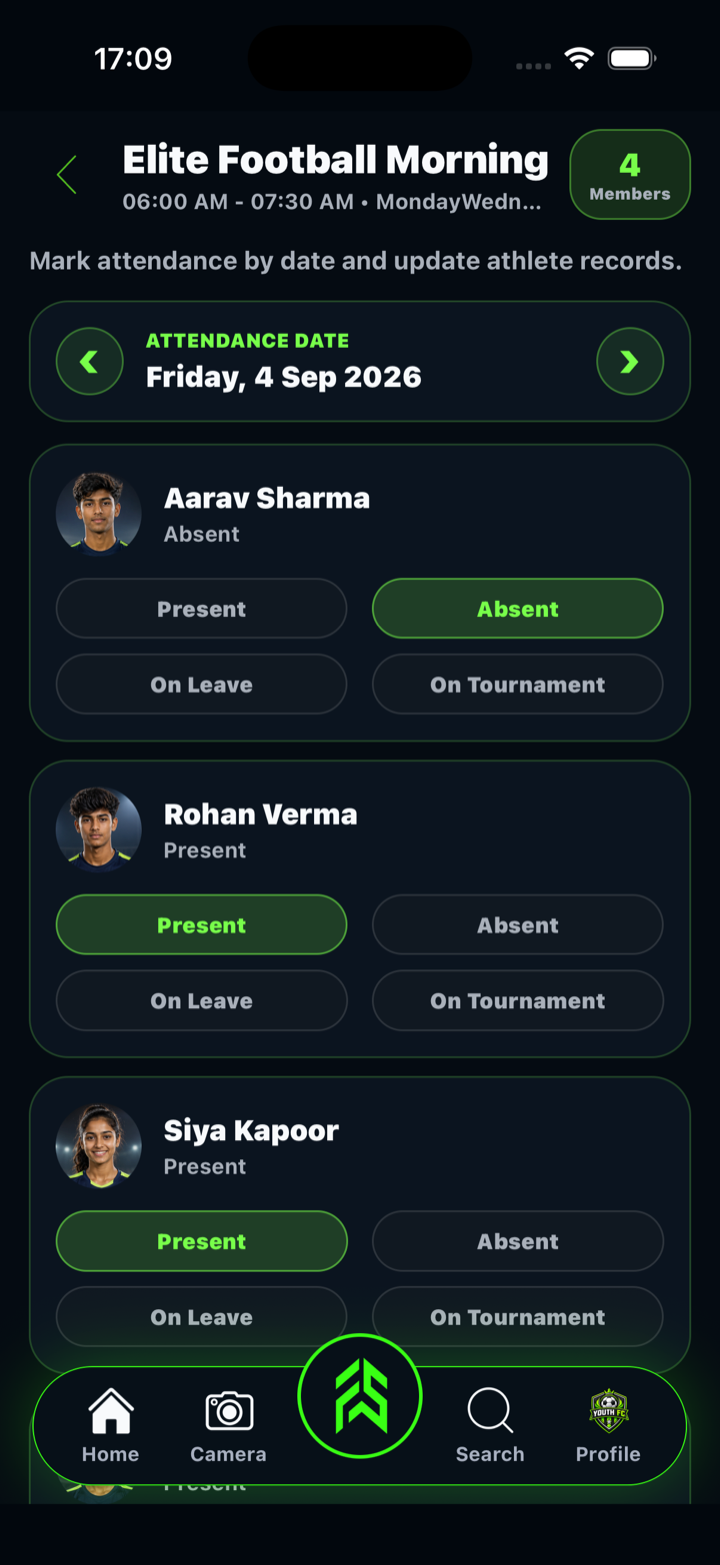
In FAB SPORTS, academies and coaches can create batches and mark attendance batch by batch. Keep batch names clear and consistent. "Morning 1" means nothing to a new parent; "U-14 Cricket, Mon-Wed-Fri, 6–8 AM" explains itself.
3. Daily attendance in under two minutes
Attendance is the most-used feature of any academy app, so it has to be fast. Look for:
- Batch-wise marking, so the coach sees only the players in front of them
- More than present/absent, because "on leave" and "at a tournament" are not the same as missing training
- History by athlete, so you can see a three-week fade before the family quietly leaves
FAB SPORTS lets coaches mark each athlete as Present, Absent, On Leave or On Tournament, and athletes can see their own day-by-day attendance in the app. For a full walkthrough of a batch routine, read Sports Tracking App for Teams, and if you are still on paper, see How to Run Sports Academy Attendance Without Registers.
4. Packages and fees: clarity first, then records
Fee confusion is the quickest way to lose a parent's trust. A good management app should let you publish clear packages and then keep a record of what was paid.
Packages. Keep two to four options, each with price, duration, days, timing and what is included. In FAB SPORTS, academies list training packages on their profile, so athletes and parents can see and compare them before they visit. Academy fees are set by each academy, not by the app.
Collection records. When an athlete buys one of your packages in FAB SPORTS and chooses Pay Directly, the purchase appears in Cash Collection under Manage Finance. Once they pay you, you tick it as collected and can see the remaining cash to collect at a glance. Only the academy owner can update cash collection, so the record stays under your control.
Income and expenses. Rent, coach salaries, balls, shuttles and transport all need a line. FAB SPORTS lets you keep a record of income and expenses alongside the rest of the academy. For a full fee policy, read How to Manage Sports Academy Fees and Payments and our new guide to a free academy fee collection app.
5. Training plans and progress parents can see
Parents pay for progress, not just attendance. The academies that keep families longest show what each week is for.
- Weekly plans: coaches set the week's sessions, timings and drills, and connected athletes can see their coach's plan.
- Performance records: simple repeatable tests (sprint, jump, endurance, skill drills) logged on the same day each month.
- Achievements: tournament results and milestones on the athlete profile.
For test ideas, see Sports Performance Tracking: 7 Tests and our draft guide to an athlete performance tracking app.
6. Staff, roles and who can change what
Once you have more than one coach, decide who can do what. A head coach may mark attendance for every batch; an assistant only for theirs. Money is more sensitive: decide who collects cash and who records it. In FAB SPORTS you can add staff to the academy, and cash collection stays with the academy owner. Write your rules down and share them with the team.
7. Being found by new families
Management is not only internal. Parents now search for academies on their phones, so your academy profile matters. A complete profile has a clear name, sport, city and area, photos, achievements and packages. FAB SPORTS shows academies and coaches to nearby athletes through Find Nearby, so a well-filled profile works like a free listing. If you want more families from your own city, also read How to Grow a Sports Academy.
8. Checklist: choosing a sports academy management app
Before you commit, test any app against this list:
| Question | Why it matters |
|---|---|
| Can a coach mark a batch in under two minutes? | Slow apps get abandoned within a month |
| Does it separate absent, leave and tournament? | Fair records and fewer arguments |
| Can parents and athletes see attendance and plans? | Fewer "did my child come today?" calls |
| Can you list packages with price, days and timing? | Clear fees build trust |
| Can you record cash collection and expenses? | You know what is pending, every week |
| Does it cost a monthly subscription? | Small academies feel every recurring cost |
| Does it work on the phones your coaches already use? | No extra hardware |
With FAB SPORTS, every tool is free, no subscription. Academy fees and any product prices on the app are set by academies and sellers, not by FAB SPORTS.
9. A two-week switch-over plan
Week 1: Create the academy profile, add batches and packages, and add your coaches. Mark attendance in the app and on paper in parallel so nobody worries.
Week 2: Stop the paper register. Ask athletes and parents to connect with the academy in the app so they can see attendance and the weekly plan. Record every payment received that week in Cash Collection.
Month 2: Start one monthly performance test per batch. Review attendance patterns every Sunday and call families whose child has missed three sessions in a row.
Frequently Asked Questions
What is a sports academy management app?
It is an app that helps an academy owner run daily operations in one place: batches, attendance, training plans, packages, fee and cash records, staff and communication with athletes and parents.
Is FAB SPORTS free for academies?
Yes. Every FAB SPORTS tool is free, with no subscription. Academy fees and product prices shown in the app are set by academies and sellers.
Can I track fees in FAB SPORTS?
Yes. Academies list packages on their profile. When an athlete buys a package and chooses Pay Directly, it appears in Cash Collection under Manage Finance, where the academy owner ticks it as collected and sees what is still pending. You can also keep records of income and expenses.
Can parents see their child's attendance?
Athletes can see their own day-by-day attendance in the app, and connected athletes can see their coach's weekly plan, so families do not have to ask the coach every day.
Does it work for any sport?
Yes. The batch, attendance, package and performance tools work for cricket, football, badminton, athletics, karate and other sports. For sport-specific setups, read our guide to a cricket academy app and badminton academy software.
Final word
A sports academy management app will not coach your players. What it does is give you back the hours lost to registers, cash diaries and repeated parent calls, so you can spend them on the ground. Start with batches and attendance, add packages and cash records, then layer on plans and performance tests.
Ready to run your academy from one app? Download FAB SPORTS free on the App Store or Google Play, set up your academy profile with batches and packages, and mark your first attendance today. Every tool is free, no subscription.